CRAFT AI
Guide: connect Claude and build
Everything you need to connect your Claude account and build with CRAFT AI, step by step. It takes about ten minutes, and you only do it once.
Last updated
What you need
- Minecraft: Java Edition 26.3 with Fabric (Fabric Loader 0.19.5 or later, and Fabric API). CRAFT AI does not work with Forge or NeoForge.
- Java 25, which the launcher usually brings.
- A Claude subscription: Pro, Max, Team or Enterprise. The free plan does not include Claude Code.
- A CRAFT AI licence: 15 €, paid once, for one computer.
Install Claude Code
CRAFT AI talks to Claude through Claude Code. Install it once, on the computer you play on.
- Open the Claude Code page and follow the installer for your system. On Windows, use the native installer.
- Check that it worked: open a terminal and run the command below. A version number means Claude Code is installed.
claude --versionInstall the mod
- In the Install section, download the CRAFT AI file and Fabric API, and install Fabric Loader for Minecraft 26.3 if you do not have it yet.
- Put both .jar files in the mods folder of your Fabric profile, and remove any older craftai-*.jar. The usual folder is
%appdata%\.minecraft\modson Windows,~/Library/Application Support/minecraft/modson macOS and~/.minecraft/modson Linux. With another launcher (Lunar, Prism, Modrinth, CurseForge), use the mods folder of your profile. - Start Minecraft 26.3 with Fabric and open a world. Press K to open the CRAFT AI panel (you can change the key in Options → Controls).
Connect your Claude account
The mod checks your Claude account for you and, if it is not connected, lets you connect it without leaving the game.
From the game (the easy way)
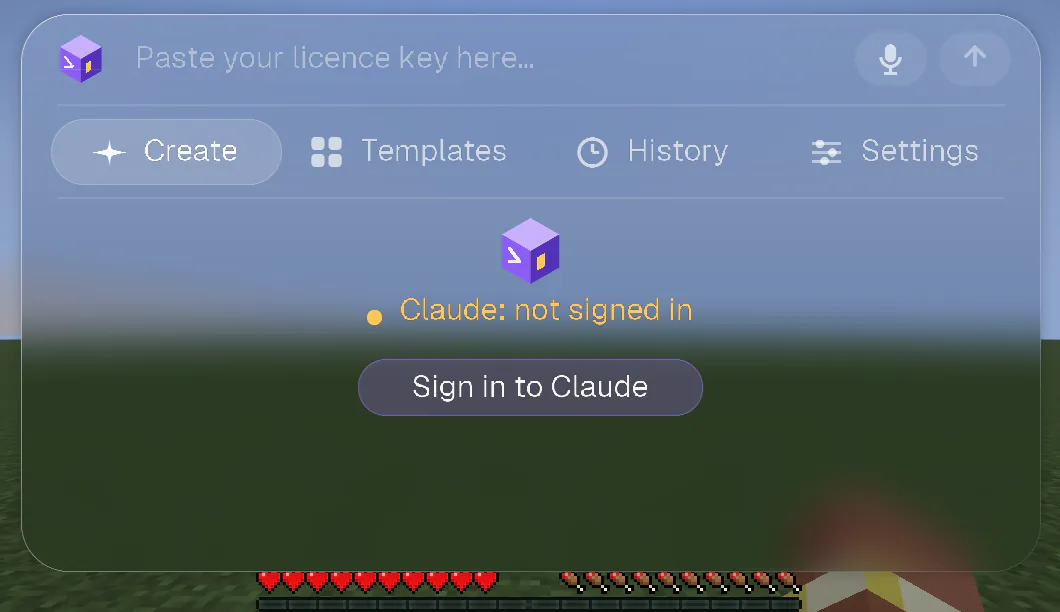
- Open a world and press K. The welcome screen names your Claude account. If it says Claude: not signed in, click Sign in to Claude.
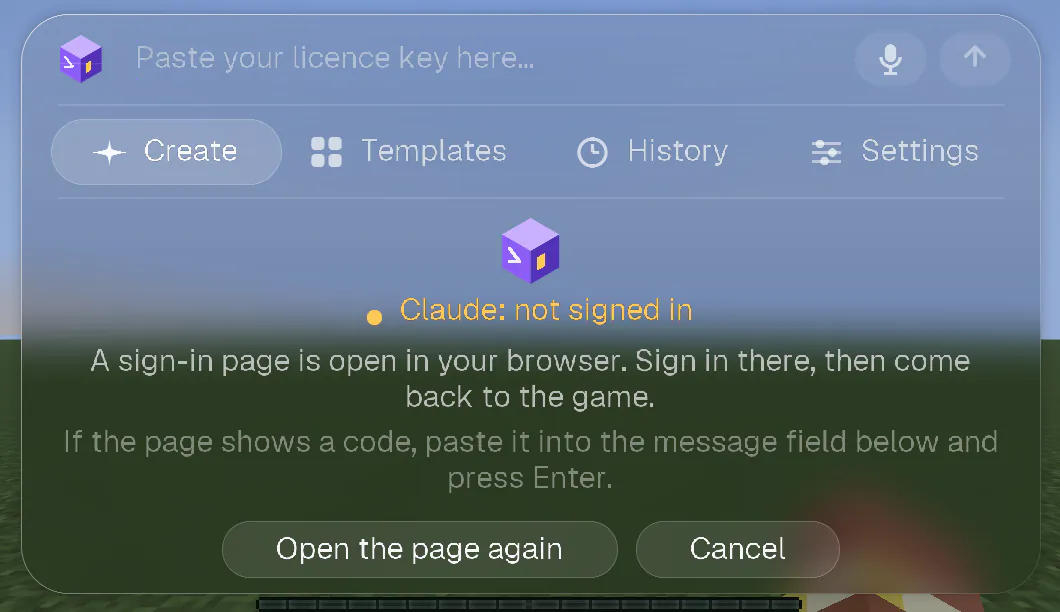
- Your browser opens on Claude's sign-in page. Sign in with the account that has your subscription and approve. If the page did not open, click Open the page again.
- Come back to the game. It notices by itself and writes that you are signed in. If the page shows a code instead of finishing, copy the code and paste it in the message field of the panel, then press Enter: it goes straight to Claude Code, never to the AI.
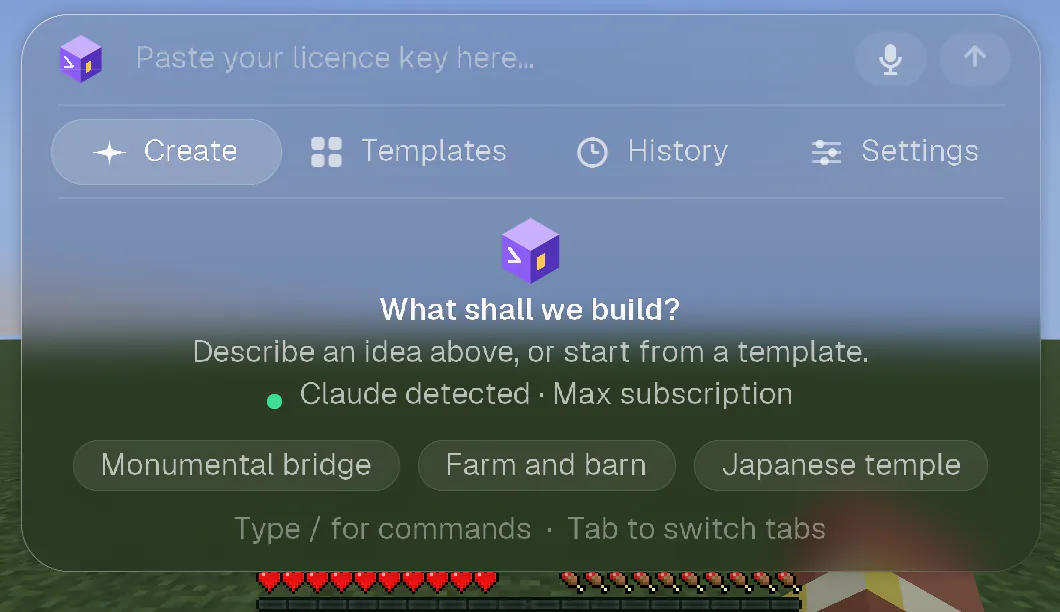
- Check: the welcome screen now says Claude detected · Max subscription (or Pro, Team, Enterprise).
From a terminal
- Open a terminal and run
claude. - Type
/loginand choose your Claude account (the one with the subscription). - Sign in in the browser, then come back to the game. It looks again as soon as you return to its window.
What the mod checks, and when
- Before every request you send, so the panel is never out of date.
- When you come back to the game window, for example after signing in in the browser or a terminal.
- Every 10 seconds while the panel shows a problem, and every 3 minutes otherwise.
- If your account signs out while you play, the conversation tells you once.
What the panel says, and what to do
| The panel says | What it means, and what to do |
|---|---|
| Claude detected · Max subscription | All good. You can build. |
| Looking for Claude… | The mod is looking. It takes a second. |
| Claude: not signed in | Claude is installed but nobody is signed in. Click Sign in to Claude. |
| Claude Code not found | Claude Code is not installed, or the mod cannot find it. Click How to install it, or see step 1. |
| Claude: free plan, Pro or Max needed | Your Claude account is on the free plan, which does not include Claude Code. Upgrade to Pro or Max (the button My Claude account takes you to your account). |
| Claude: API key, not your subscription | Claude Code is signed in with an API key, and CRAFT AI uses your subscription. In a terminal, run claude, type /logout, then /login and choose your Claude account. |
| Claude: could not check | Claude Code did not answer. Usually it is temporary: wait a moment and open the panel again. If it lasts, see Troubleshooting below. |
Activate your licence
- On the Account page, sign in or create an account, then buy your licence (15 €, once). Your licence key appears on your account page.
- In the game, press K, paste the key in the field at the top (it says “Paste your licence key here…”) and press Enter. The licence is attached to this computer.
- To check it at any time, type
/license. To use CRAFT AI on another computer, type/license releaseon the first one.
Your first build
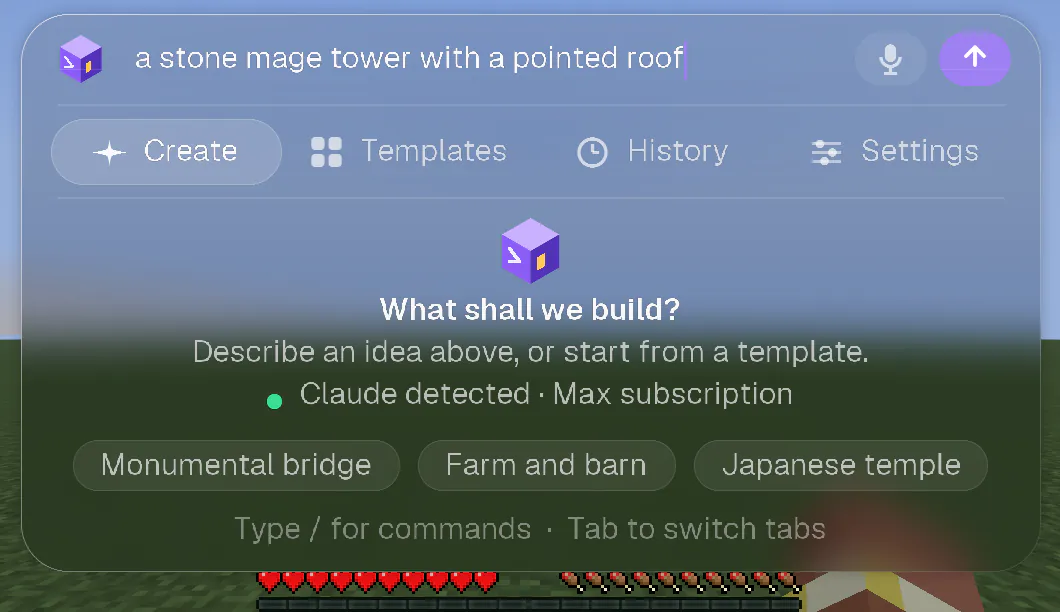
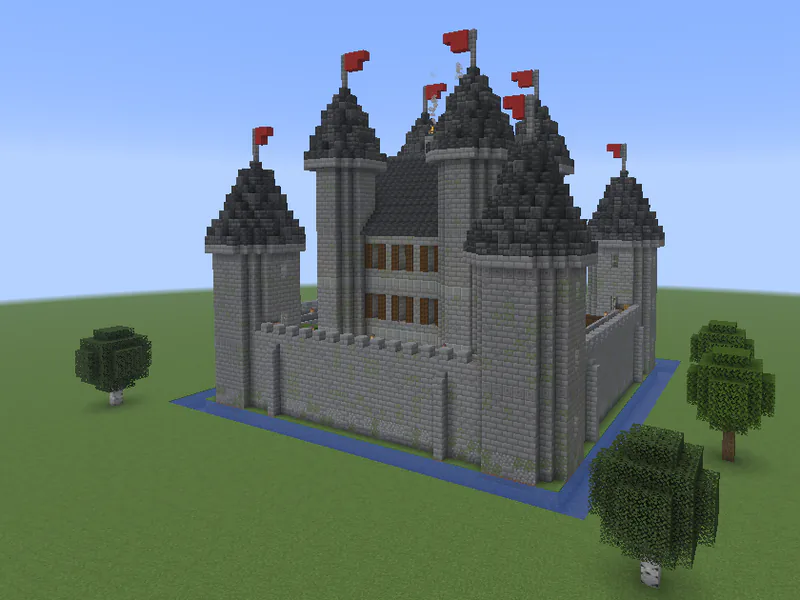
- Press K. In the field at the top (“Describe what you want to build…”), describe what you want, in any language: “a stone mage tower with a pointed roof”.
- Press Enter. The capsule at the top of the screen shows the progress. You can close the panel and keep playing.
- The build appears block by block. A short animation plays when it is done.
- Not what you wanted? Type
/undo, or open the History tab. Describe what to change and try again.
Tips for better builds
- Look at the place where you want it and say “here” or “over there”. The AI sees what you look at and a map of your surroundings.
- Be specific about the style and the materials: “a Japanese pagoda in dark wood and white plaster on the hill”.
- Choose how detailed it should be in Settings, under Level of detail. More detail takes longer.
- To build inside an exact area, select a zone with
/zone wand. On a multiplayer server, look at two corners and use/zone 1and/zone 2.
Go further
- Voice: hold V, say what you want, let go. Your words become the request. It runs on your computer: your voice never leaves it.
- Undo and redo:
/undo,/redo, or the History tab. Type/in the field to see every command. - Model: choose the Claude model in Settings, or with
/model. - Multiplayer: it works on servers where you are allowed to use
/filland/setblock. Nothing is installed on the server: the mod builds from your computer, with your rights. A player who is not an operator builds at about one command per second. - Updates: the mod tells you when a new version is out, and one click installs it. Type
/updateto check.
Troubleshooting
I clicked Sign in to Claude and nothing opened.
Click Open the page again: the game opens the page through its own “open this link?” screen. If you prefer, copy the address, open it in any browser and sign in. If the page shows a code, paste it in the message field of the panel and press Enter.
I signed in, but the game still says Claude is not signed in.
Come back to the game window and wait up to ten seconds: the mod looks again every time you return and every 10 seconds while the panel shows a problem. If it still says so, click Cancel and try again, or run
claude then /login in a terminal.It says Claude Code is not found, but I installed it.
The mod looks in the usual folders, in your PATH and in your shell. A launcher does not always pass your PATH on: set the CRAFTAI_CLAUDE_PATH environment variable to the full path of the claude program. On Windows, use the native installer: the claude.cmd that npm installs is not used.
It says API key, not your subscription.
Claude Code is signed in with an API key. CRAFT AI builds with your subscription, so switch Claude Code to your Claude account: in a terminal, run
claude, type /logout, then /login and choose your Claude account. The mod never replaces your sign-in without you.It says free plan.
Claude Code needs a Claude Pro, Max, Team or Enterprise subscription. Upgrade your plan, then reopen the panel: the mod looks again by itself.
A request fails right away.
Open the panel and read the Claude line on the welcome screen, or the Claude account row in Settings. It says what is missing. Then check your licence with
/license.I am still stuck.
Read the FAQ, or write to us from the contact address on the legal notice.