How to write a good request for an AI that builds in Minecraft
A good request to an AI that builds in Minecraft says what to build, where, how big, in what style and with which materials. A short sentence is enough to start; add detail where you care. This guide shows that structure with CRAFT AI, the Minecraft mod: levels, pointing at a spot, undo, and 24 ideas.
Last updated Applies to CRAFT AI 0.13.0, Minecraft: Java Edition 26.3
What does a good request contain?
A good request names six things: what to build, where, how big, which style, which materials, and how much detail. You do not need all six every time. What you leave out, the AI chooses for you.
| Part of the request | What to write |
|---|---|
| What | The subject: “a lighthouse”, “a mage tower”, “a bridge”. |
| Where | Look at the spot and say “here” or “over there”, or mark an area with /zone wand (see below). |
| How big | Say it in words: “small”, “tall”, “three floors”, “a whole village”. |
| Style | Name one. The mod’s instructions to the AI include eight styles: Medieval, Modern, Futuristic, Japanese, Nordic, Steampunk, Rustic and Fantasy. If you name a style, the AI follows it. |
| Materials | Name them: “in dark wood and white plaster”, “in stone with a slate roof”. |
| Level of detail | Choose Quick, Detailed or Masterpiece in the settings (next sections). |
Here is one sentence that holds all six parts:
Build a stone watchtower over there on the hill, about 20 blocks tall, in Nordic style, with dark wood, a turf roof and torches along the stairs.
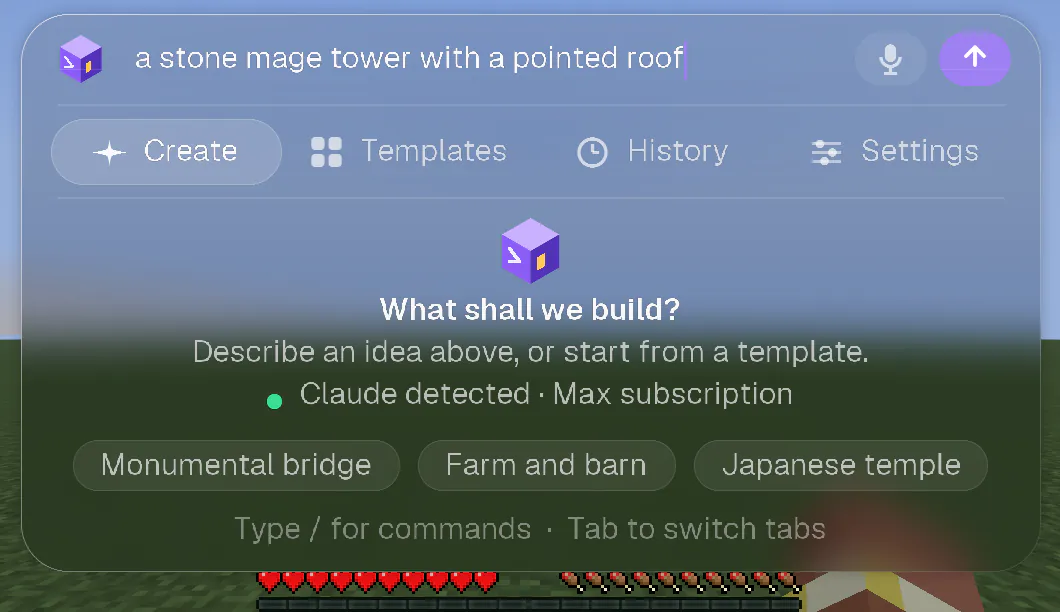
Write in your own language: the AI answers in the language of your request. You can also hold V and say it.
How precise should my request be?
As precise or as vague as you like. A short sentence is enough to start, and detail helps where you care about the result. The mod draws a random creative direction on every request, and your words take priority over it.
The same idea, short:
A lighthouse on the cliff
And with detail, as written in the mod’s own Cliff lighthouse idea:
Build a lighthouse on a cliff with a tall red and white striped tower, a big lantern at the top, the keeper's house, a staircase cut into the rock and a small jetty.
Add detail where it matters to you (the materials, the size, a feature you want) and leave the rest to the AI.
Quick, Detailed or Masterpiece: which level should I choose?
Choose Quick for something simple, and Masterpiece, the default, when you want detail, an interior and a setting. The higher the level, the more the AI thinks and the longer the build takes.
| Level | What the mod asks the AI to do | Typical time |
|---|---|---|
| Quick | A clean, recognisable structure in few steps: clear volumes, two materials, a door, windows, a simple roof and one light. Interiors and landscaping are skipped unless you ask for them. | About 1 to 3 minutes |
| Detailed | A silhouette with depth, three or four materials, a trimmed roof, framed doors and windows, outside lighting, a simple furnished interior for a building and a touch of setting. The AI looks once at the facade and the plan before finishing. | About 3 to 6 minutes |
| Masterpiece | The default. Ten steps: concept, site, volumes, facades, materials, roofs, light, interior, setting, then the AI proofreads its own work with elevation views before it answers. | About 6 to 16 minutes |
These times are the mod’s own starting estimates for its default model, Sonnet. They are typical, not promised: the mod itself only tells you whether a request should be quick or will take a little longer.
To change the level, open Settings, then Level of detail, or type /detail quick, /detail detailed or /detail masterpiece.
How do I tell the AI where to build?
Look at the spot and say “here” or “over there”, or mark an area with /zone wand: the AI then builds only inside it.
Say where, in words
- “Here”, “next to me” and “in front of me” mean where you stand and face: the AI builds in front of you.
- “Over there” means the spot you are looking at.
- The mod’s instructions to the AI also cover “to my left”, “to my right”, “behind me” and places such as your bed, the world spawn, where you died or your latest build.
- If you give no place, the AI builds in front of you, about 6 to 15 blocks away.
Mark an area with the wand
- Type
/zone wand: you get the CRAFT AI wand. - Left-click a block for corner 1 and right-click a block for corner 2. The outline of the zone appears in violet dust, and the panel shows its size.
- Write what you want, for example “Right here, I want a bridge”. The AI builds only inside the zone, and the game refuses every write outside it.
Each side of a zone is at most 128 blocks. The zone stays for your next requests until you clear it with /zone clear or with the cross in the panel.
On a multiplayer server there is no wand: look at a block and type /zone 1, then look at another block and type /zone 2.
How do I change a build instead of starting over?
Ask for the change in the same conversation, for example “add a garden”: a follow-up keeps the style of what is already built. If you do not like the result, undo it and rephrase.
- Follow-up ideas. After a build, the Create tab proposes ideas such as Add lighting, Furnish the inside, Add a garden, More details, Night mood, Enlarge and Add a pond.
- Undo and redo. Use the Undo and Redo buttons, or
/undoand/redo./undo 2undoes the last two builds. - History. The History tab lists your builds and your recent requests, which you can reuse with a click.
- New conversation.
/clearstarts a new conversation.
Where do I find ready-made ideas?
In the Templates tab of the panel: 24 ideas in 6 categories. Type to filter them, then press Enter or click one to start it.
| Category | Ideas |
|---|---|
| Homes | Country cottage, Modern villa, Treehouse, Farm and barn |
| Castles & towers | Medieval castle, Wizard tower, Cliff lighthouse, Gothic cathedral |
| Villages & places | Medieval village, Fishing harbour, Japanese temple, Windmill |
| Nature | Giant ancient tree, Formal garden, Lake and waterfall, Floating island |
| Fantasy & sci-fi | Stone dragon, Spaceship, Steampunk laboratory, Witch's lair |
| Monuments | Monumental bridge, Monumental fountain, Pyramid, Airship |
Each idea is a ready-written request. Reading a few is a good way to see how a full request is built.
What mistakes should I avoid?
These five come from how the mod works, and each has a simple fix.
| Mistake | What the mod does | What to do instead |
|---|---|---|
| Giving no place | The AI builds in front of you, about 6 to 15 blocks away. | Look at the spot and say “here” or “over there”, or mark a zone. |
| Asking for an interior or a garden at the Quick level | That level skips interiors and landscaping unless you ask for them. | Write them in the request, or choose Detailed or Masterpiece. |
| Expecting the same build twice | Every request draws a random creative direction, so the same sentence gives two different builds. | To keep a build you like, ask for changes in the same conversation instead of repeating the sentence. |
| Starting over for a small change | A follow-up in the same conversation keeps the style of what is already built. | Ask for the change (“add a garden”), or undo with /undo and rephrase. |
| Forgetting a backup | In your own world the AI acts as your operator, and what a command changes cannot always be undone. | Back up worlds you care about before a big build. |
Frequently asked questions
Can I write my request in French, Spanish or German?
Yes. The panel and the commands exist in English, French, Spanish and German, and the AI answers in the language of your request. You can write in any language.
How long should a request be?
There is no rule: write it as precise or as vague as you like, from “a lighthouse on the cliff” to a full description. Add detail where you care about the result.
Does the same request always give the same build?
No. On every request the mod draws a random creative direction, so the same sentence twice gives two different builds. Your words always take priority over it.
Can I speak my request instead of typing it?
Yes. Hold V in the game, say what you want to build and let go. Your words are turned into text on your own computer and sent as your request.
Do these tips work with other AI builders?
They are written for CRAFT AI. We have not tried them with other tools, so we make no claim about them.